How to set up an x402-enabled endpoint with Monad support
This guide shows how to set up payable endpoints using x402 payments and Monad's facilitator. It works on Monad testnet/mainnet.
What is x402?
x402 is the HTTP 402 "Payment Required" status code reborn as a minimal protocol for internet‑native micropayments.
Instead of subscriptions or paywalls that require accounts, x402 lets any HTTP endpoint become instantly payable:
- Client requests a resource
- Server responds 402 with a small JSON payment requirement
- Client pays with a signed transaction
- Server verifies and serves the content
Beyond legacy limitations
x402 is designed for a modern internet economy, solving key limitations of legacy systems:
- Reduce fees and friction: Direct onchain payments without intermediaries, high fees, or manual setup.
- Micropayments & usage-based billing: Charge per call or feature with simple, programmable pay-as-you-go flows.
- Machine-to-machine transactions: Let AI agents pay and access services autonomously with no keys or human input needed.
Why x402 on Monad?
Monad is a fully EVM‑compatible Layer 1 with:
- 10,000 TPS
- ~0.4s block times
- Single‑slot finality
- Parallel execution
- Extremely low fees
These properties make Monad an ideal environment for true micropayments and agent-to-agent commerce. Payments settle instantly at low cost and avoid mempool congestion, perfect when many AI agents pay per API call.
Core Flow (Direct Payment)
Facilitator Flow (Recommended for Production)
A facilitator service is optional but recommended in production. Facilitators can batch transactions, cover gas, handle refunds, and simplify client logic.
Building an x402-based app using Monad x402 facilitator
Prerequisites
- Node.js 18+
- An EVM wallet
- Access to Monad testnet funds (USDC test tokens below)
Monad Facilitator only supports x402 version 2 and above.
Migration guide that explains the differences: https://docs.x402.org/guides/migration-v1-to-v2
How to get USDC tokens on Monad testnet
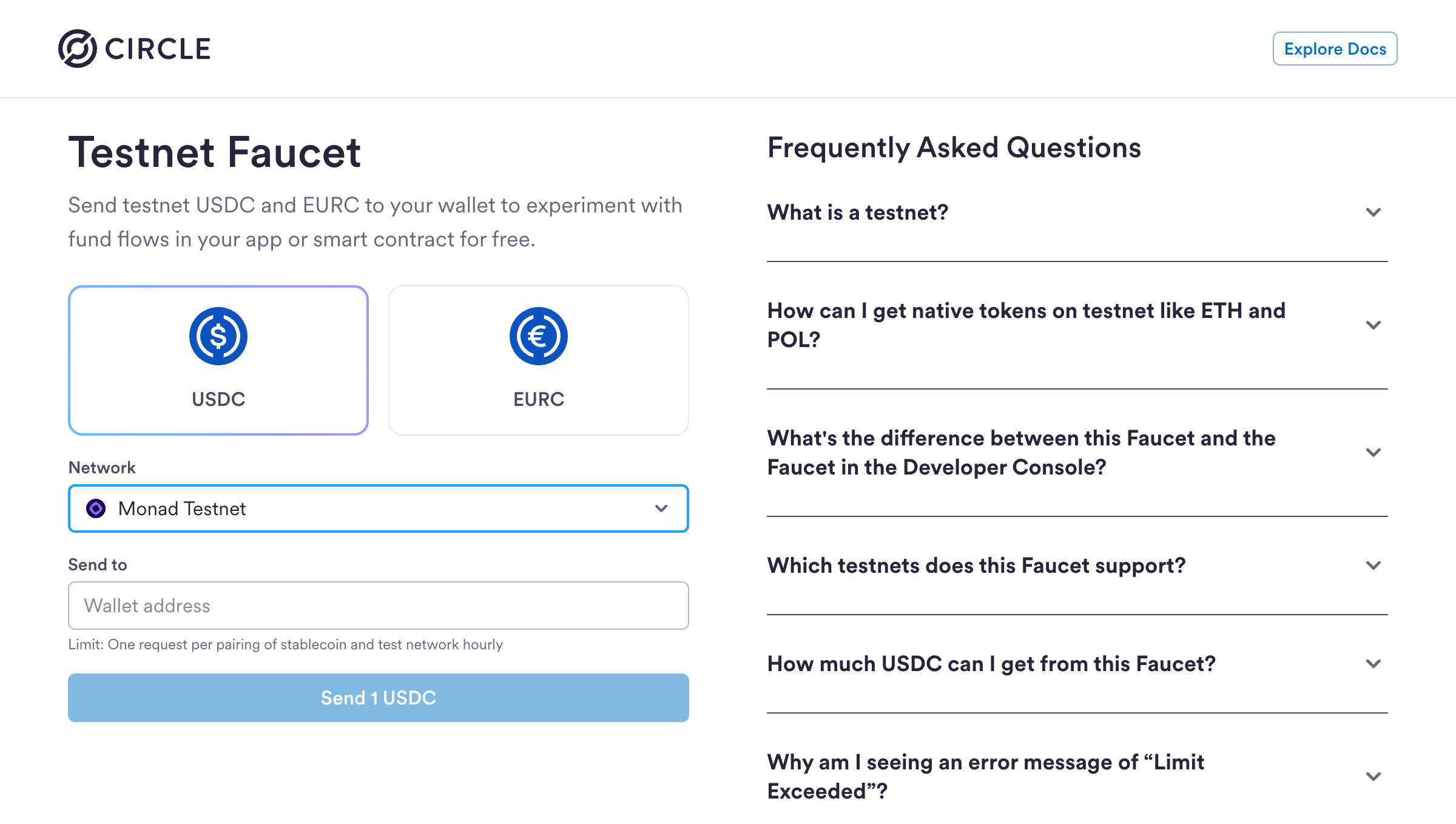
You can get USDC tokens for Monad testnet using Circle's faucet:
- Visit https://faucet.circle.com
- Select USDC as the token
- Select Monad Testnet from the Network dropdown
- Enter your wallet address
- Click Send 1 USDC
Limit: One request per (stablecoin, testnet) pair every 2 hours
You'll also need testnet MON tokens for gas fees. Get them from the Monad faucet.
Step 1: Initialize a Next.js App
Create a new Next.js project:
npx create-next-app@latest my-x402-appWhen prompted, select the following options:
- ✅ TypeScript
- ✅ ESLint
- ✅ Tailwind CSS
- ✅
src/directory - ✅ App Router
- ✅ Customize default import alias:
@/*(default)
Navigate to your project:
cd my-x402-appInstall the x402 packages:
Install x402 packages with version 2.2.0 and above.
npm install @x402/core @x402/evm @x402/fetch @x402/nextCreate a .env.local file for your environment variables:
touch .env.localStep 2: Create a payTo address
A payTo address is used to receive payments and interact with the blockchain from your backend.
Copy the wallet address and add it to your .env.local file as PAY_TO_ADDRESS
PAY_TO_ADDRESS=0xYourWalletStep 4: Create a server side payable endpoint
12345678910111213141516171819202122232425262728293031323334353637383940414243444546474849505152535455565758596061626364656667
Step 5: Client-side setup (consuming paid endpoint)
Below is an example of consuming the paid endpoint using a Next.js app, however the endpoint can be consumed via an agent script as well.
123456789101112131415161718192021222324252627282930313233343536373839404142434445464748495051525354555657585960616263646566676869707172737475767778798081828384858687888990919293949596979899100101102103104105106107108109110111112113114115116117118119120121122123124125126127128129130131132133134135136137138139140141142143144145146147148149150151152153154155156157158159160161162163164165166167168169170171172173174175176177178179180
Running Your x402 App
Now you're ready to test your x402 payment flow:
-
Start your development server:
npm run dev -
Open http://localhost:3000 in your browser
-
Click "Pay & Unlock Content"
-
Connect your wallet
-
Approve the USDC payment
-
See the content unlock instantly!
Facilitator API
For developers who are interested in using the barebones Facilitator API, here are the supported endpoints with examples.
Facilitator URL: https://x402-facilitator.molandak.org
Network support: Mainnet and Testnet.
GET /supported
Returns supported networks, schemes, and signer addresses.
const FACILITATOR_URL = "https://x402-facilitator.molandak.org";
async function testSupported(): Promise<void> {  console.log("\n--- GET /supported ---");
  const response = await fetch(`${FACILITATOR_URL}/supported`);  if (!response.ok) throw new Error(`Failed: ${response.status}`);
  const data = await response.json();  console.log(JSON.stringify(data, null, 2));  return data;}
POST /verify
Verify a payment signature.
interface NetworkConfig {  chainId: Network;  name: string;  rpcUrl: string;  explorerUrl: string;  usdcAddress: `0x${string}`;  usdcDecimals: number;  chainIdNumber: number;}
/** * This function manually constructs and signs the EIP-712 typed data that * the x402 client library handles automatically. */async function testVerify(  account: ReturnType<typeof privateKeyToAccount>,  networkConfig: NetworkConfig): Promise<{ isValid: boolean; payload: any }> {  console.log("\n--- POST /verify ---");  const now = Math.floor(Date.now() / 1000);  const nonce = keccak256(toHex(Math.random().toString()));  const ACCOUNT_ADDRESS = "0x0000000000000000000000000000000000000000";
  // TransferWithAuthorization parameters (ERC-3009)  const authorization = {    from: ACCOUNT_ADDRESS, // Account that is paying    to: PAY_TO_ADDRESS, // Receiver address    value: "1000", // 0.001 USDC (6 decimals)    validAfter: (now - 60).toString(), // Start validity 60s in the past to handle clock skew    validBefore: (now + 900).toString(), // 15 minutes    nonce,  };
  // EIP-712 domain - must match USDC contract's DOMAIN_SEPARATOR  const domain = {    name: "USDC",  // Monad USDC uses "USDC" (not "USD Coin")    version: "2",    chainId: BigInt(networkConfig.chainIdNumber),    verifyingContract: networkConfig.usdcAddress,  };
  // EIP-712 type definition for TransferWithAuthorization  const types = {    TransferWithAuthorization: [      { name: "from", type: "address" },      { name: "to", type: "address" },      { name: "value", type: "uint256" },      { name: "validAfter", type: "uint256" },      { name: "validBefore", type: "uint256" },      { name: "nonce", type: "bytes32" },    ],  };
  const message = {    from: authorization.from,    to: authorization.to,    value: BigInt(authorization.value),    validAfter: BigInt(authorization.validAfter),    validBefore: BigInt(authorization.validBefore),    nonce: authorization.nonce as `0x${string}`,  };
  const signature = await account.signTypedData({    domain,    types,    primaryType: "TransferWithAuthorization",    message,  });
  const requestBody = {    x402Version: 2,    payload: {      authorization,      signature,    },    resource: {      url: "http://test/resource",      description: "Test resource",      mimeType: "application/json",    },    accepted: {      scheme: "exact",      network: networkConfig.chainId,      amount: authorization.value,      asset: networkConfig.usdcAddress,      payTo: authorization.to,      maxTimeoutSeconds: 300,      extra: {        name: "USDC",        version: "2",      },    },  };
  const response = await fetch(`${FACILITATOR_URL}/verify`, {    method: "POST",    headers: { "Content-Type": "application/json" },    body: JSON.stringify(requestBody),  });
  const data = await response.json();  console.log(JSON.stringify(data, null, 2));
  return { isValid: data.isValid, payload: requestBody };}
POST /settle
Execute the payment on-chain. Facilitator pays gas.
interface NetworkConfig {  chainId: Network;  name: string;  rpcUrl: string;  explorerUrl: string;  usdcAddress: `0x${string}`;  usdcDecimals: number;  chainIdNumber: number;}
/** POST /settle - Execute the payment on-chain. Facilitator pays gas. */async function testSettle(  payload: any,  networkConfig: NetworkConfig): Promise<void> {  console.log("\n--- POST /settle ---");
  const response = await fetch(`${FACILITATOR_URL}/settle`, {    method: "POST",    headers: { "Content-Type": "application/json" },    body: JSON.stringify(payload),  });
  const data = await response.json();  console.log(JSON.stringify(data, null, 2));
  if (data.success && data.transaction) {    // Transaction success  } else if (data.errorReason) {    console.log(`Failed: ${data.errorReason}`);  }}
What's Next?
You've successfully built an x402 payment-enabled app on Monad! Here are some ideas to extend your implementation:
- Add more payable endpoints - Create different pricing tiers for various content or API calls
- Build AI agent integrations - Enable autonomous agents to pay for and access your APIs
Resources
Need Help?
If you run into issues or have questions, join the Monad Developer Discord
Happy building!